 Window Peeper AI Video
Window Peeper Trend AI Video Generator
Turn one clear photo into a 14-second window peeper trend video — watch a real sample first, no sign-up to look.
Upload one clear photo
Front-facing, eyes visible, no sunglasses. Keep your face clearly lit.

One person · Eyes visible · Soft, even light on the face
Illustrative photo comparison; it does not show tested generation results.
JPG, PNG or WebP, up to 10MB.
Video format
MP4, ready to download from My videos.
The sample video is free to watch. Generating from your photo costs 50 credits.
Video scenes
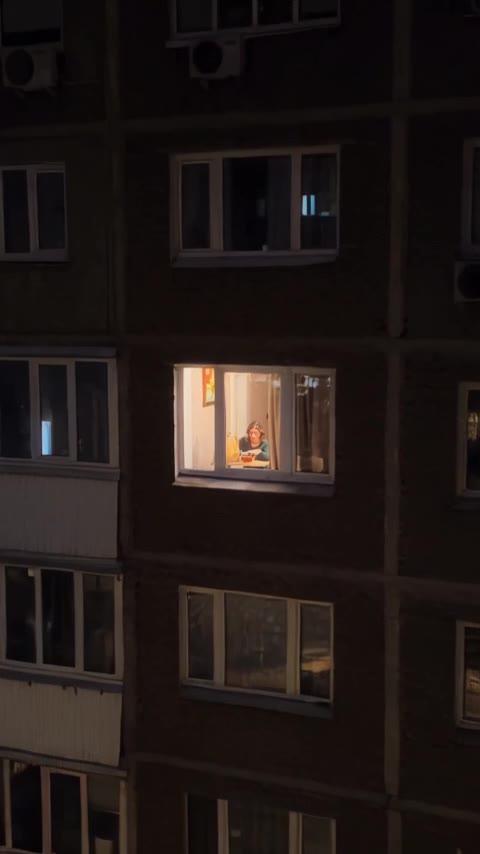 01A view toward a lit window.
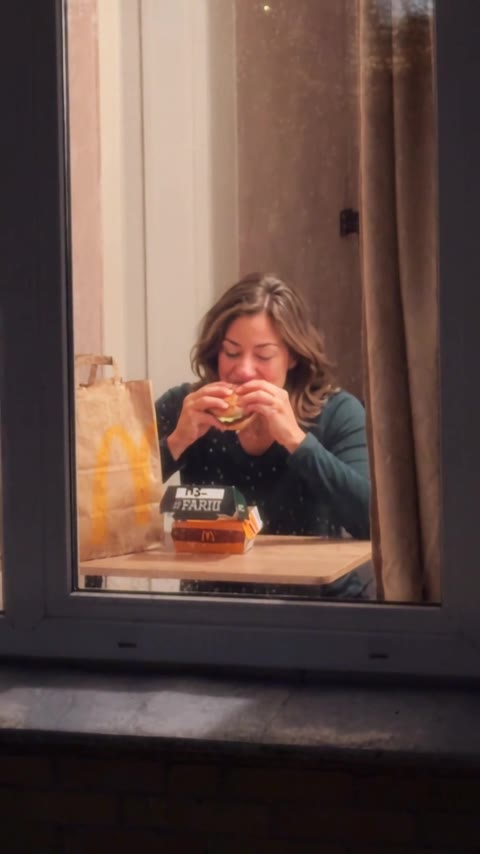 02A slow move closer to the window.
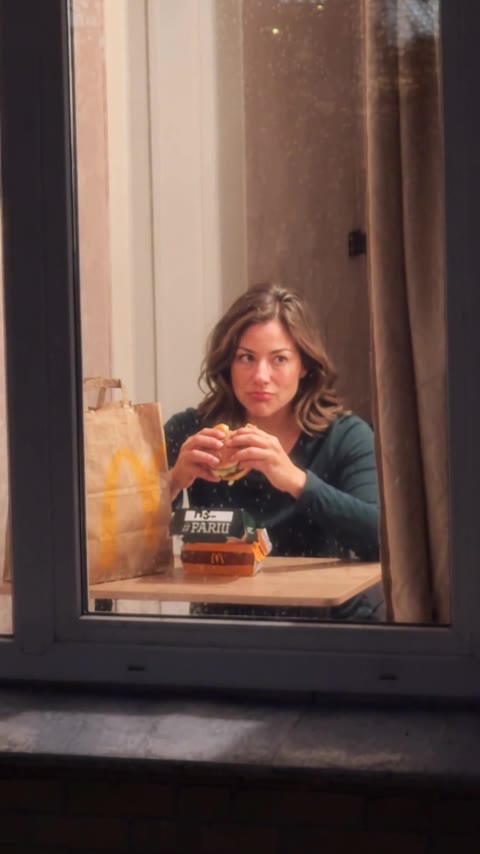 03The subject notices the camera outside.
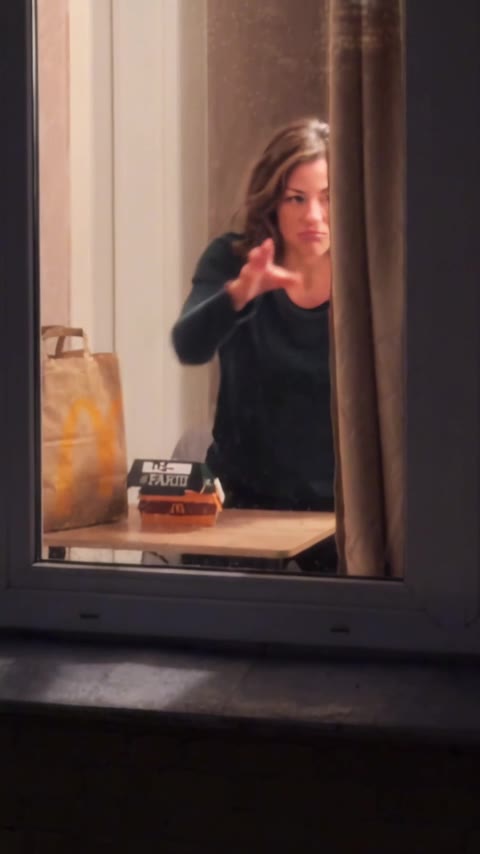 04The curtain closes the shot.
What is the window peeper trend?
The window peeper effect follows a slow zoom toward a lit window, a look toward the camera and a curtain closing. This tool turns one photo into a short version of that scene. It started spreading on TikTok in late October 2026.
You do not have to film the shot. Upload one photo and let the generator create the motion. Your result can differ from the sample video.
Format preview →
CapCut template vs. AI generator
A CapCut template is a pre-built edit — you still film yourself at a window and drop the clip in. An AI generator builds the footage itself: you give it one photo and the whole clip is generated. The question is whether you already have a clip of yourself at a window. If you do, the template is free and faster. If you don't, only the AI route works without filming.
This site isn't affiliated with CapCut, ByteDance or TikTok.
Not the Halloween prop.
The "Scary Peeper" is a fake face you stick in a window to scare trick-or-treaters. Same words, different thing. And not a real peeping video either — the trend is staged comedy, nobody appears in it without agreeing.
For a window peeper prank, keep the scene staged, get everyone's consent and avoid filming strangers or making anyone feel unsafe.
How to make a window peeper trend video
Upload one clear photo
Sign in, then upload one front-facing photo with visible eyes and good light.
Pick a one-time pack
Packs start at $6.99. There is no subscription or auto-renewal.
Generate, download, post
Spend 50 credits to make a 14-second MP4, then download it from My videos.
What you give, what you get
One photo
- A single clear front-facing photo of one person
- JPG, PNG or WebP, up to 10MB
- Eyes visible, face comfortably filling the frame
One finished clip
- 14-second video in 9:16 portrait format
- 480p resolution
- Audio included
- No watermark
- Download from My videos when complete
Which photo works best for a window peeper video
Choose a clear photo with one face large enough to see, visible eyes and even light. The examples beside the upload box show how blur, darkness or a small face can hide useful detail.
Works best
- 01One person alone in the frame
- 02Front-facing, eyes visible, no sunglasses
- 03Soft, even light on the face
- 04A face looking toward the camera
- 05A clear background; window light can suit the scene
Avoid
- 01Group photos
- 02Side profiles or faces turned away
- 03Blurry shots, and shots where the face is very dark
- 04Face small in the frame
- 05Heavy filters or anything covering the eyes
What goes wrong, and how to fix it
Most avoidable problems begin with the input photo. Review it before spending credits: one person, visible eyes, even light and enough detail to see the face. This is photo advice, not an automated quality check.
The face looks soft or changes too much
Try a sharper photo where the face fills more of the frame. Remove heavy filters, sunglasses and anything covering the eyes or mouth. A side profile gives the model less information than a front-facing portrait. If several people appear, crop to one person before uploading. These steps improve the input; they do not guarantee an identical face in every frame.
The face is too dark to read
Try a photo with soft light on the face. A warm window or lamp can suit the mood, but avoid a completely silhouetted face in the uploaded image.
The upload or generation does not complete
Use one JPG, PNG or WebP image no larger than 10 MB, and confirm you have permission to use the photo. If the image safety check rejects it, choose another suitable image. If that check is unavailable, try again later; generation will not start and no credits are deducted. Follow an accepted task in My videos rather than repeatedly starting new ones.
A completed video can differ from the format preview even when the photo follows every tip. If generation itself fails, deducted credits are returned to your balance. If a completed result has a problem, contact support with the task details so it can be reviewed; a finished render still uses credits.
How to post your window peeper video
Download the completed MP4 from My videos. It is a 14-second, 9:16 portrait clip with audio and no watermark. Watch the file before sharing so your caption matches your result.
Post to TikTok
In TikTok, start a new post, choose Upload and select the downloaded MP4. Check the crop and preview before publishing; the portrait file should fit a vertical post, but the app may show interface elements over its edges. If you want a specific trend sound, choose it from TikTok's sound library and decide whether to keep, lower or replace the clip's original audio. Add a short caption that explains the photo-to-video transformation, then choose your audience and post.
Post as an Instagram Reel
In Instagram, create a Reel and import the same MP4 from your device. Preview the full 14 seconds, choose a cover frame where the face is readable, and check that any text sits away from the top and bottom interface areas. Instagram may offer music, text and trimming controls; use only what helps the clip. Before sharing, review the caption, audience and any account-specific sharing options shown in the app.
You can post the file directly or edit it elsewhere. This tool is independent of TikTok, Instagram and CapCut. Label AI-generated content when the destination platform requires it.
Pricing — $6.99 per window peeper video, no subscription
One-time payment. No subscription, no auto-renewal, and no free generation trial.
1 video
One-time purchase
$6.99
$6.99 per video
One-time purchase
1 video
Fixed quality: Standard 480p
50 credits per generation
50 credits
2 videos
Save $3.99
$9.99
$5.00 per video
One-time purchase
2 videos
Fixed quality: Standard 480p
50 credits per generation
100 credits
4 videos
Save $10.97
$16.99
$4.25 per video
One-time purchase
4 videos
Fixed quality: Standard 480p
50 credits per generation
200 credits
6 videos
Save $16.95
$24.99
$4.17 per video
One-time purchase
6 videos
Fixed quality: Standard 480p
50 credits per generation
300 credits
The bigger the pack, the less each video costs.
Each generation uses 50 credits. Failed renders return their credits.
Window peeper FAQ
Is this an official TikTok or CapCut tool?
No. This independent tool is not affiliated with TikTok, CapCut, Instagram or the creators of the trend. Upload only your own photo or one you have permission to use.
What is the window peeper trend?
It is a short photo-to-video format built around a window, a slow zoom, a stare and a closing curtain. The sample video shows the idea; your result may vary.
How do I make a window peeper AI video?
Sign in, upload one clear photo, buy a one-time credit pack and start a generation. Follow its status in My videos, then download the finished clip.
Which photo works best?
Choose a clear photo of one person facing the camera, with visible eyes and even light on the face. Avoid group photos, side profiles, blur and a face that is too small or dark in the frame.
Will the face look exactly like my photo?
Your photo guides the result, but facial details and expressions can vary. A clear, well-lit, front-facing photo gives the model more detail to work with.
Will my clothes and room stay the same?
The model uses your photo and the window peeper reference scene. Clothing, background and facial details may change in the finished video.
Can I post the result to TikTok or Reels?
Yes. Download the 9:16 MP4 from My videos and upload it. Check the crop and audio in the destination app before posting.
Is there a free window peeper AI video generator?
No free generation is offered. You can watch the sample video and read the photo tips before signing in. A completed generation uses 50 credits; failed generations return their credits.
Is this a CapCut template?
No template or app installation is required. Upload a photo here and download a finished MP4. You may edit it elsewhere if you wish.
What exactly do I get?
A 14-second, 480p, 9:16 MP4 with audio and no watermark. One completed generation costs 50 credits.
How much does it cost?
Current one-time packs are $6.99 for one video, $9.99 for two, $16.99 for four and $24.99 for six. Check the pricing page before purchase for the current prices and credit amounts.
What if my video fails?
If a generation fails, its deducted credits are returned to your balance. A completed video still uses credits. If you have a problem with a completed result, contact support and include the task details.